Disclaimer: I used two generative AI search responses from the search engine brave in writing this post. “What search engine usage data gets tracked and why?” and “How do search engines make money?” As someone who is legitimately concerned about AI-generated content influencing my perceptions of the world, I figured both of those questions would be low-stakes and easily verifiable.
Big Brother may not be watching you, but Big Data is. If you spend any time online, your search queries and browsing history are most certainly stored somewhere. Your information is ostensibly used for the purposes of providing you with better, more tailored services, but it is likely also being used for targeted advertising to sell you stuff (physical and philosophical). The only reason I hedged the previous sentences as much as I did is because I know people who go to great lengths to protect their personal data on the internet – but the fact of the matter is that most of us are far less discerning about the traces we leave online.

Image credit: [1]
Given last week’s post on how we interact with generative AI, [2] it made sense to take a closer look at where we might interact with it. Although I try to avoid it for multiple reasons (such as keeping my brain healthy and active and keeping my environmental impact as light as possible), it seems to be unavoidable, especially when it comes to searching the internet. Google searches have now inserted an AI-generated summary of my search results at the top of the page so I don’t even need to do my own research. I don’t know to what extent the AI summary is tailored to the individual doing the search, but the search results themselves have, for years, been heavily influenced by personal data. Consequently, in addition to previous concerns about my personal data being used to influence my search results, I now worry more about my search results influencing my perception of the very subjects I am trying to research. (Note: I did, at least, install a plug-in to disable the AI summary in Chrome.)
Perception is Reality
Years ago, a self-described “hyper-private” and tech-savvy person I knew suggested I use DuckDuckGo as opposed to Google for my internet searches because it wouldn’t store or use my search data. At the time, I questioned why using my own search history to refine my results was a bad thing. After all, if I’m down a rabbit hole on a certain research topic (as I tend to be), it’s incredibly helpful for me when the results prioritize relevant content related to the subject at hand, instead of giving me something completely random and useless that happens to fit the same search terms.
Sweet summer child that I was back when this conversation would have happened (around 2012, around the time Cambridge Analytica was being formed), [3] I had no sense of what was to come – even the term “big data” meant nothing to me at the time. It simply did not occur to me that online echo chambers would become so insulated and so polarized, that it would happen so quickly, or that it would have such a profound effect on our society and our political system. Keeping my data private for privacy’s sake is one thing, but what concerns me far more (having lived through the last decade) is the extent to which our reality is shaped by what we see online every day. And having Google’s AI interpret my search results for me was a bridge too far.
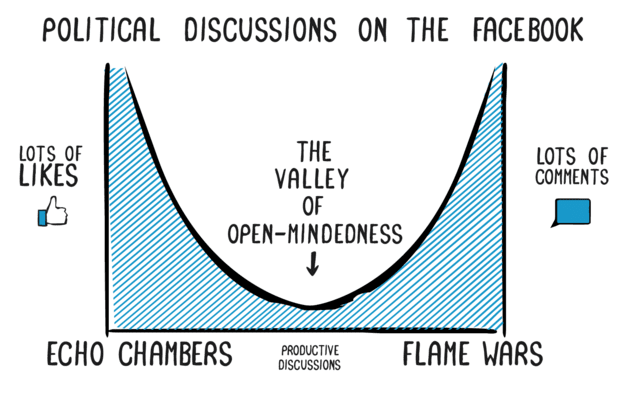
Image credit: [4]
I try to seek out opposing viewpoints when I’m learning about a new topic; I try to request Devil’s Advocate stress-testing of my assumptions when I’m sharing my opinions. But forcing myself to do that is difficult – I don’t particularly like being told when I’m wrong (even if I do see the value in it), but, even more than that, I feel like I’m less likely to encounter pushback in many of the circles where I spend most of my time. A lot of the people who read my blog, for example (thank you, by the way), are already connected with me on social media, meaning we’ve probably got some common ground when it comes to social, economic, and environmental positions, not to mention similar upbringings and educational backgrounds. In short: trying to break out of the echo chamber is hard, even when you’re actively trying to do it. (And before you say it: yes, I see the irony and recognize that generative AI could help me on that front if I ask it to have an argument with me.)
Evaluating Our Options
And yet, even after all of that time and all that I know now, Google is still my default search engine (along with its default suite of other products and services for storage and collaboration). Somewhat recently, a different private and tech-savvy friend posted some recommendations on social media for alternate search engines, specifically two that she described as friendlier for personal privacy and environmental impact: Ecosia, [5] which plants trees, and ekoru, [6] which removes plastic from oceans and plants seagrass. I was skeptical about their business models, but search engines generally make money from ad revenue, and these two are no different – they just invest their profits toward environmentally beneficial actions. Nevertheless, it was absolutely worth examining the many other non-Google search engines on the internet and evaluating factors like privacy, quality of results, and environmental impact.
It is worth noting that most “alternate” search engines still use the web crawlers from some of the bigger names, especially Google and Bing, which both track and store user data to a level that has been described by some as “surveillance.” [7] In my research for this post, I’ve encountered advice that amounts to “just don’t use Google,” but that Bing is just as bad from a data-tracking standpoint, only with results that “aren’t as good.” Almost all of the alternatives I saw recommended use Google and/or Bing’s web crawlers but store less user data, don’t store it as long, and/or have options for more anonymized searching.
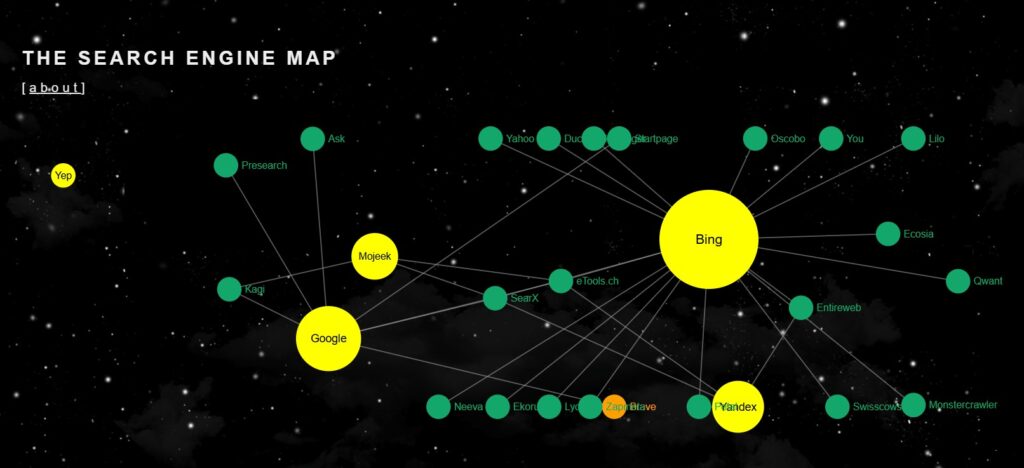
Image credit: [8]
Unfortunately, some of the ones that didn’t use a big web crawler simply didn’t have good results – meaning that if you want better results, you’re going to pay for them one way or another (usually with your data). Every option in the list below uses Google and/or Bing but has some improved privacy protections in one way or another. It’s also worth noting that some search engines were recommended for certain types of searches, since not all search engines are created equally: [9],[10],[11],[12]
- brave – uses Bing and Google to fill in gaps from their own index; can turn off analytics, good for privacy, search customization, images, and AI summaries
- DuckDuckGo – uses Bing; can get easier access to smaller research publications, good for anonymity, has ads but they aren’t targeted to you
- ekoru – uses Bing; environmental focus
- Ecosia – uses Bing; good for supporting the environment, certified B Corp
- MetaGer – gets a lot of results from Yahoo, which gets its results from Bing
- Startpage – uses Google; can use anonymous view, good for research and technical searches
- Swisscows – uses Bing; good for music and family-friendly search results (also the most adorable logo of the bunch)
- Qwant – uses Bing; good for Europe-centric searches
- Whoogle – uses Google; open-source and self-hosted, good for image search
- Yahoo! – uses Bing; good for news and financial information
Brave and Startpage were the two from that list that came most highly recommended in my research for easy-to-use search engines with good results and decent privacy protections. (And I did use brave for some content and image searches while writing this series.) However, if you really want to avoid Google, Bing, and other big equivalents altogether, there are some other search engines worth mentioning, which came up frequently in internet forums on the subject:
- kagi, which has its own web crawler with good results and a lot of options for customizing your search parameters.
- mojeek, which has its own, albeit small, web crawler and a good privacy policy. The search results have been described as “not great,” and it uses “emotion-based” machine learning to analyze the vibe of what it finds. Based on that description alone, I would be reluctant to use this one for research.
- searx, which is more hands-on, if you’re comfortable with that. It’s an open-source, self-hosted project that lets you choose which search engines you want for aggregating results, lists the reliability rate for each, and lets you verify the source code through github (if you so choose). Unfortunately, it appears to be discontinued, and I’m not sure if that means unsupported or unavailable.
While this subject is a complex one, it is clear that better (i.e. more accurate, comprehensive, unbiased) results come at a cost. We know that one of the tradeoffs is personal privacy, but another is the sheer amount of energy it takes to run these searches and list the results. I didn’t say as much about generative AI results (and their subsequent environmental impacts) as I initially planned to in this post because the gap between finding results and analyzing results is massive – and we will open that entirely separate can of worms next week.
~
In the meantime, let me know how you feel about Big Data and big search engines. What is your favorite Google/Bing alternative? (And what did I get wrong?)
Thanks for reading!
[1] https://www.reliablesoft.net/top-10-search-engines-in-the-world/
[2] https://radicalmoderate.online/please-and-thank-you
[3] https://radicalmoderate.online/november-2020-elections-part-2/
[4] https://www.progressfocused.com/2016/11/coming-out-of-our-echo-chambers.html
[7] https://www.youtube.com/watch?v=Yjm6lGwqnGs
[8] https://www.searchenginemap.com/
[9] https://www.youtube.com/watch?v=Yjm6lGwqnGs
[10] https://www.youtube.com/watch?v=osven54J4so
[12] https://jharding.co.uk/what-search-engines-are-powered-by-bing/#google_vignette
0 Comments